Your mods are broken.
The game just won't say so.
Kitsune Mod Doctor reads your Mods folders and your game logs, finds the stuff that silently fails, and tells you what's wrong in plain words. The safe fixes take one click. And every one of them can be undone.
Version 0.1.0 · 3.4 MB · signed installer, no admin needed
The stuff that fails without a peep
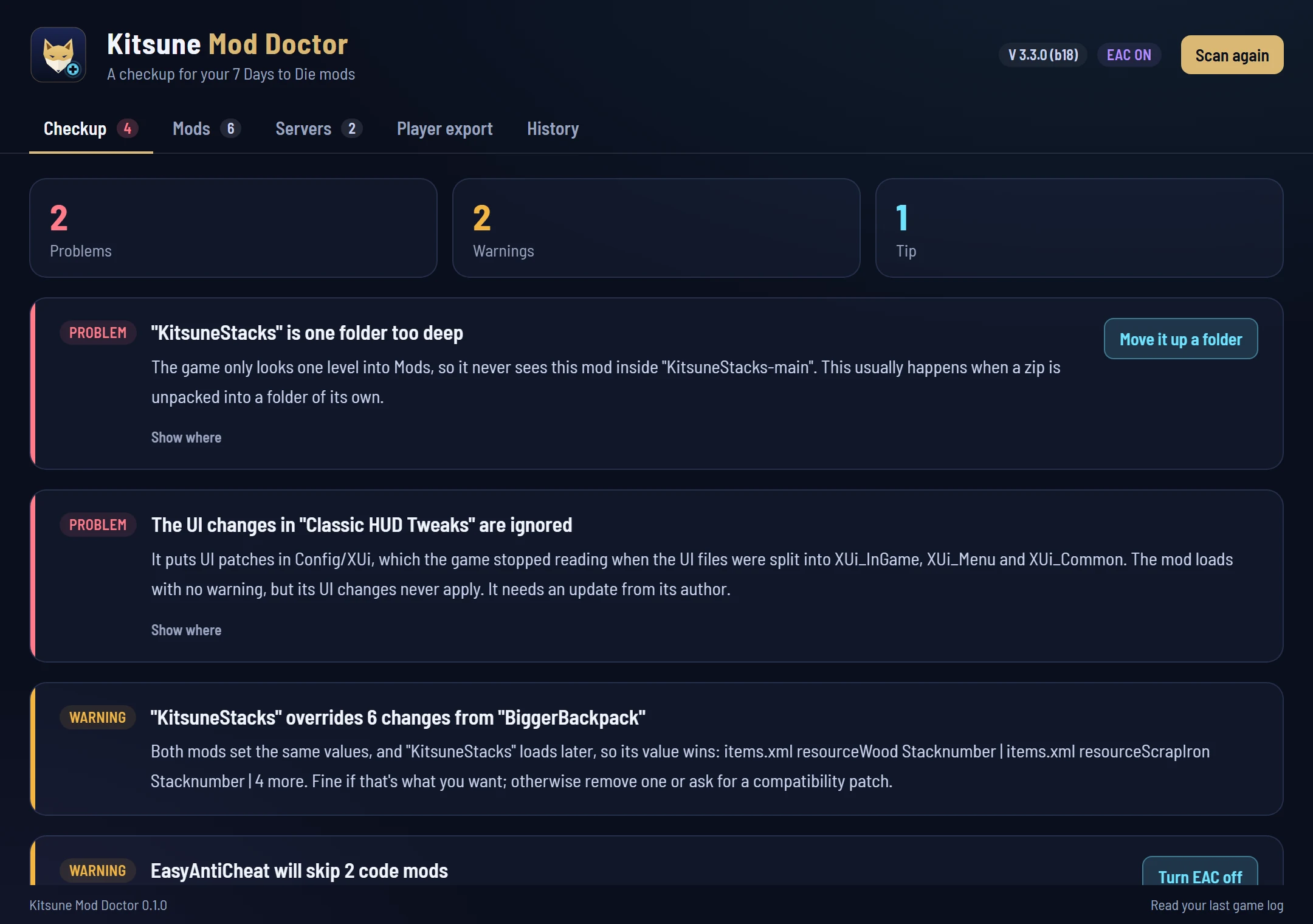
7 Days to Die is weirdly quiet about mods that don't load. Unzipped one folder too deep? Nothing. UI patches sitting in a folder the game stopped reading versions ago? Loads fine, does nothing. You find out three hours in, when the thing you installed just... isn't there.
Unzipped one folder too deep
The game only looks one level into Mods, so Mods/SomeMod 1.2/SomeMod never loads. Happens constantly with zips.
UI patches the game ignores
Older mods put UI changes in Config/XUi. The game split that into XUi_InGame, XUi_Menu and XUi_Common and stopped reading the old one. No warning. The changes just never happen.
Code mods vs EasyAntiCheat
EAC skips every mod with a DLL. If EAC is on, your code mods aren't running, period. One click turns it off and backs up your old setting.
One-click fixTwo copies of the same mod
Your AppData Mods folder loads before the game's own, so its copy wins. The doctor tells you which one actually runs (and can park the other).
One-click fixBroken files
Config XML that won't parse, ModInfo.xml files that are broken or old enough to predate Alpha 21, and code mods that need Harmony when Harmony's gone.
DLLs fighting
Two mods shipping different copies of the same DLL. The game loads a name once, so one mod quietly runs on the other's copy.
Mod clashes
Every mod's XPath patches get compared in load order: two mods setting the same value (the later one wins), one mod removing something another one changes, two mods adding an item, block or window with the same name. Only exact matches get reported. Add-ons named after their base mod, and mods that check for each other with mod_loaded(), are left alone. No false alarms for stuff that was built to stack.
What your game logs already know
The doctor reads both log folders (including Player.log in LocalLow, where launcher-started games end up) and pulls out what matters: mods EAC skipped, code that failed to start, Harmony patches aimed at game code that doesn't exist anymore (with the likely mod named), XML changes that didn't apply, and config files the game failed to load. The log had it the whole time. It's just that nobody reads the log.
Joining a server is where it gets weird
When you join, the server sends you its own copy of most config files (items, blocks, loot, the UI windows) and your game uses those instead of yours. Which means a mod that changes those files only works on servers that run it too. The doctor lists those mods, so you stop wondering why your stack sizes reset every time you log in.
It also keeps track of every server you've joined: its name, address, when you were last there, and what broke right after it sent its configs. A config that fails to load right after joining almost always means your mods don't match the server's.
And old server caches (SavesLocal) from earlier game versions get flagged with their size. Clearing one is safe; the game rebuilds it when you rejoin.
- Exact checks with PackRelayIf a server you play on is listed in PackRelay, the doctor grabs the pack and version it actually runs and compares your Mods with it file by file: what's missing, what's different, and which extra mods you run that it doesn't.
- Signatures firstThe pack's manifest is checked against its publisher's Ed25519 key before anything gets compared. One that fails isn't used at all, and you get told if the key isn't one your PackRelay launcher already trusts.
- One click to matchOut of sync? Open the server in PackRelay and it installs exactly what the server runs.
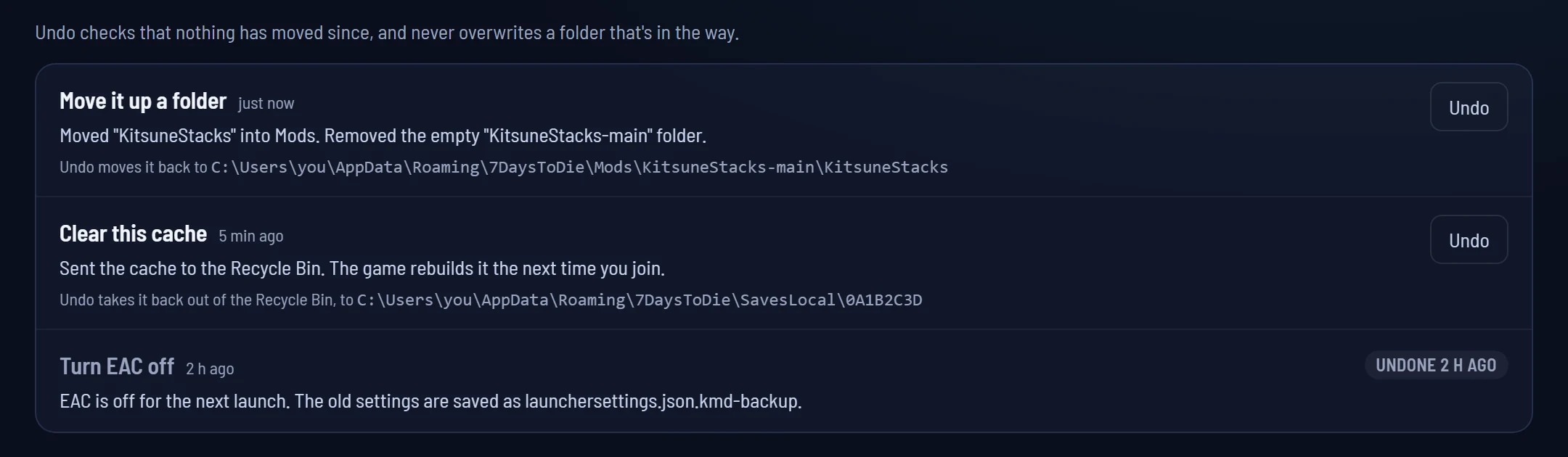
Every fix can be undone. Every single one.
Folders get moved, never deleted. Caches go to the Recycle Bin. Settings are backed up before they change. And the History tab keeps a list of everything the doctor has done, with an Undo button on each, even after you close the app and come back next week.
Take a character with you
Player export bundles one character (inventory, skills, quests and explored map) into a zip, along with the save's item and block mappings and a list of the mods you had installed. Keep it as a backup, or move that character to another world.
In multiplayer your character lives on the server, not your PC. To move one between servers, export it from a copy of the server's Saves/<world>/<game> folder.
It runs on your PC. That's it.
No account, no tracking, no uploading your mod list anywhere. The scan is instant and works offline.
The only time it goes online is the PackRelay check, and even then it downloads PackRelay's whole public server list and does the matching on your machine. Your server addresses never leave it.
Get the doctor in
Kitsune Mod Doctor 0.1.0
Download the installer942582409B12D57F5AA446144303B3A188819D4C20439DAAD3258619DD67A4B9
- Run the installer. It installs just for you, so no admin prompt.
- Start Kitsune Mod Doctor. It finds the game and your Mods folders by itself and runs a checkup straight away.
- Close 7 Days to Die before you hit a fix button, then scan again after playing so it can read the full log.